Geprüft am Prototyp im Reiter „Lernmaterialien“ der Demoanwendung, angebunden ist die Mediathek MUNDO. So kommt man hin: In der Demoanwendung unter den Übersichtskarten den Reiter „Lernmaterialien“ öffnen, eine Kompetenzstufe wählen und dann „MUNDO Suche“ anklicken. Die Abfragen an MEM und an die Beispieldaten stammen vom 14.10.2026.
Ergebnis
- Technisch machbar. Eine Lehrkraft öffnet MUNDO aus der Demoanwendung heraus, wählt Material aus und erhält es zurück. Es hängt dann direkt an der Kompetenzstufe oder Lerngruppe, an der sie gerade arbeitet. Dafür genügt ein verbreiteter Standard (LTI 1.1 Content-Item Selection), MUNDO muss dafür nichts Neues bauen.
- Fachlich bringt es wenig, solange die Lehrkraft nicht schon weiß, was sie sucht. Die Suche beginnt in MUNDO mit einer leeren Maske. Aus der Rückmeldung geht nichts in die Suche ein: keine Kompetenzstufe, keine Leitidee, keine Aufgabe.
- Eine Suche, die von der Rückmeldung ausgeht, scheitert an zwei Lücken. Die Rückmeldungen nennen ihre Kompetenzen nur als Kürzel ohne Bezugssystem. Und die Mediathek lässt sich nicht nach Leitidee oder Bildungsstandard durchsuchen, weil ihre Materialien nicht danach erschlossen sind.
- MEM kann eine Seite der Brücke tragen, nicht beide. Der Ontologieserver führt die KMK-Bildungsstandards mit stabilen Adressen und löst zum Beispiel die Mathematik-Leitideen L1 bis L5 auf. Die Verbindung zum Material fehlt dort aber genauso wie in der Mediathek.
Die Fragestellung
Eine Rückmeldung zeigt, wo eine Lerngruppe steht: wie viele Schüler:innen auf welcher Kompetenzstufe liegen, welche Aufgaben schwerfielen, in welchem Teilbereich die Gruppe unter dem Landesschnitt liegt. Die nächste Frage der Lehrkraft lautet: Womit arbeite ich jetzt weiter?
Die Länder betreiben Mediatheken mit geprüftem Material. Untersucht wurde, ob sich eine solche Mediathek so einbinden lässt, dass der Weg von der Rückmeldung zum Material kurz wird. Das Material soll dabei dort landen, wo die Lehrkraft es braucht: an der Stufe, an der Gruppe, im Export für die Lernplattform.
So arbeitet der Prototyp
Der Weg in Kürze
Demoanwendung                         MUNDO (mundo.schule/lti/)
─────────────                         ─────────────────────────
1. „MUNDO Suche“
2. Anfrage signieren (OAuth 1.0a)
3. Formular im Popup absenden  ─────▶  Suchoberfläche von MUNDO
                                       4. Lehrkraft sucht und wählt
                               ◀─────  5. POST an content_item_return_url
6. /lti-callback nimmt die Auswahl an
7. postMessage ans öffnende Fenster
8. Auswahl prüfen, übernehmen,
   der aktuellen Stufe zuordnen
Der Start: eine signierte LTI-Anfrage
MUNDO bietet eine LTI-Schnittstelle an. Darüber kann eine fremde Anwendung die Suchoberfläche öffnen und sich die Auswahl zurückschicken lassen. Der Prototyp nutzt dafür die Content-Item Selection aus LTI 1.1. Die Anfrage enthält diese Felder:
| Feld | Wert im Prototyp | Bedeutung |
|---|---|---|
lti_message_type |
ContentItemSelectionRequest |
„Lass die Lehrkraft etwas auswählen und schick es zurück.“ |
lti_version |
LTI-1p0 |
|
content_item_return_url |
<Herkunft>/lti-callback |
Wohin MUNDO die Auswahl schickt |
accept_media_types |
application/vnd.ims.lti.v1.ltilink,text/html |
Was zurückkommen darf |
accept_presentation_document_targets |
window |
Material öffnet sich in einem eigenen Fenster |
roles |
Instructor |
Die Anfrage kommt von einer Lehrkraft |
resource_link_id, context_id |
tba3-material-picker, tba3-demo |
Feste Kennungen der Demo |
oauth_* |
Schlüssel, Nonce, Zeitstempel, HMAC-SHA1-Signatur | Signatur nach OAuth 1.0a |
Signiert wird im Browser über die Web Crypto API
(apps/demo/src/utils/ltiOauth.js). Danach schreibt der Prototyp ein Formular
in ein leeres Popup und sendet es ab. Der Umweg über about:blank hat einen
Grund: ein Formular aus einer blob:-Adresse käme mit der Herkunft null bei
MUNDO an und würde dort abgelehnt.
Die Zugangsdaten (Tool-URL, Consumer-Key, Shared Secret) trägt man im Dialog
ein. Sie stehen auf mundo.schule/cms/lti und werden im localStorage
abgelegt.
Der Rückweg: die Auswahl kommt als Formular zurück
Nach der Auswahl schickt MUNDO ein Formular an die content_item_return_url.
Der Prototyp nimmt es unter /lti-callback an: im Entwicklungsserver über ein
Vite-Plugin (apps/demo/vite.config.js), im Docker-Container über
tools/mock-server.mjs. Die Antwort ist eine kleine HTML-Seite. Sie reicht die
Formulardaten per postMessage an das öffnende Fenster weiter.
Dort liest MundoSearchModal.jsx das Feld content_items, ein JSON-LD-Dokument
mit einem @graph. Pro Eintrag übernimmt der Prototyp diese Angaben:
| Angabe | Woher |
|---|---|
| Titel | title, sonst text |
| Beschreibung | text |
| Adresse | url, sonst die SODIX-Kennung aus custom.mn → https://mundo.schule/details/<Kennung> |
| Vorschaubild | thumbnail['@id'] oder thumbnail.url |
Den Umweg über die SODIX-Kennung braucht es, weil MUNDO bei einem LtiLinkItem
keine direkte Adresse mitschickt. Ohne diese Ableitung hätte das übernommene
Material keinen Link.
Was mit der Auswahl geschieht
Die Treffer landen in denselben beiden Ablagen wie das übrige Material
(tba3_external_materials, tba3_materials_by_level) und werden sofort der
gerade gewählten Kompetenzstufe oder Lerngruppe zugeordnet. Von da an
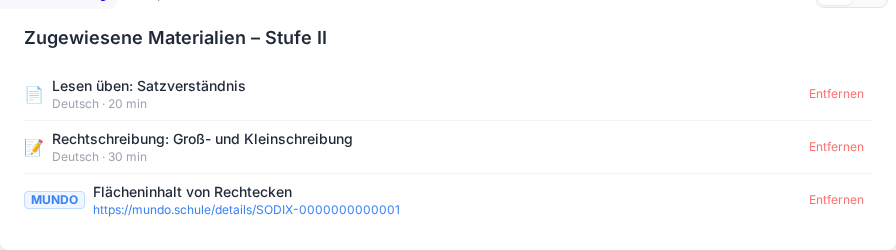
behandelt die Anwendung sie wie lokales Material: Sie erscheinen in der Liste
mit dem Vermerk „MUNDO“ und gehen in den PDF-Export und in die Common Cartridge
(.imscc) für die Lernplattform ein.
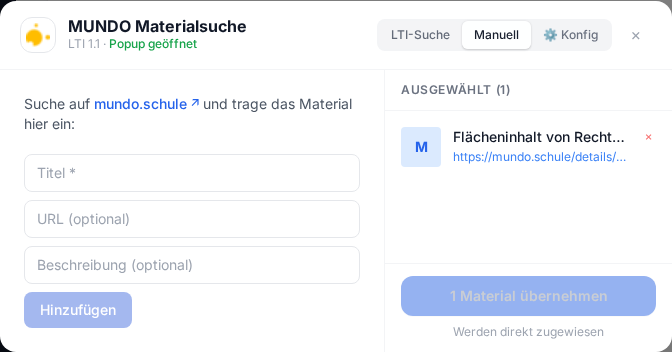
Für den Fall, dass LTI nicht zur Verfügung steht, gibt es einen zweiten Reiter. Dort trägt man Titel, Adresse und Beschreibung eines Materials von Hand ein, das man vorher auf mundo.schule gefunden hat.
Was im Prototyp vereinfacht ist
- Das Shared Secret steht im Browser. Wer die Seite öffnet, kann es auslesen. Im Betrieb gehört die Signatur auf einen Server. Besser noch wäre LTI 1.3 mit Deep Linking, weil dort Schlüsselpaare das gemeinsame Geheimnis ersetzen.
- Der Rückweg fehlt im öffentlichen Deployment.
/lti-callbackgibt es im Entwicklungsserver und im Docker-Container. Auftba3.vercel.appantwortet die Adresse mit 404 (geprüft am 14.10.2026). Dort funktioniert deshalb nur die manuelle Eingabe. postMessagegeht an jede Herkunft ('*'). Für eine Demo ist das vertretbar, im Betrieb wird die Zielherkunft festgelegt.- Die Zuordnungen liegen im
localStorage. Sie gelten nur für ein Gerät und einen Browser.
Warum der Nutzen trotzdem gering bleibt
Der Prototyp verkürzt den zweiten Schritt: Ein Material, das die Lehrkraft gefunden hat, landet ohne Kopieren und Einfügen an der richtigen Stelle. Den ersten Schritt verkürzt er nicht, also das Finden selbst.
Die Anfrage an MUNDO sagt nichts darüber, wofür gesucht wird. In ihr steht
weder die Kompetenzstufe noch die Leitidee, in der die Gruppe schwach
abgeschnitten hat, noch die Aufgabe, an der viele gescheitert sind. LTI 1.1
sieht für die Content-Item Selection auch kein Feld für einen Suchbegriff vor.
Eigene Parameter (custom_*) wären möglich, MUNDO müsste sie aber auswerten.
Die Lehrkraft steht also vor einer leeren Suchmaske und muss die Rückmeldung
selbst in Suchbegriffe übersetzen.
Für eine Lehrkraft, die genau weiß, was sie sucht („Bruchrechnung, Klasse 6, Arbeitsblatt“), ist der Weg bequem. Für die eigentliche Frage nach der Rückmeldung („Was hilft einer Gruppe, die bei Messen auf Stufe II liegt?“) leistet er nichts, was die Lehrkraft nicht auch in einem zweiten Browserfenster hätte.
Damit die Rückmeldung selbst die Suche anstoßen kann, müssten beide Seiten dieselbe Sprache sprechen. Das tun sie heute nicht, und zwar auf keiner der beiden Seiten.
Lücke 1: Die Rückmeldungen nennen ihre Kompetenzen nur als Kürzel
Die Schnittstelle sieht Kompetenzangaben vor: an jedem Item hängen
competences mit Typ, Name, Beschreibung und id. In den Beispieldaten des
Referenzservers, auf denen die Demoanwendung läuft, sind diese Felder so
gefüllt:
| Feld | Inhalt in den Beispieldaten |
|---|---|
domain (Teilbereich) |
Zweibuchstabige Kürzel (le, ho, zo, gm, ms …), id immer null |
competences[].name |
Kürzel wie 3.3.b, 1.09m, L4, K2 |
competences[].description |
in keinem einzigen Eintrag gefüllt |
competences[].id |
immer null |
competenceLevel.id |
immer null |
Die Leitidee steht also da, nur eben als L4. Das Problem ist, dass ein solches
Kürzel erst zusammen mit seinem Bezugssystem etwas bedeutet. Das zeigt sich
deutlich, wenn man es nachschlägt. Die Schreibweise 3.3 tragen in MEM
39 verschiedene Standards aus 38 Kompetenzkatalogen, von „Texte erschließen“
(Deutsch, Primarstufe) bis „Wirkung von Katalysatoren“ (Chemie). Auch die
Mathematik-Leitideen sind nicht eindeutig. Die Bildungsstandards von 2004
zählen sie als L1 bis L5 („Leitidee Zahl“, „Leitidee Messen“ …). Die Fassung
von 2022 nummeriert sie 1 bis 5 und schneidet sie anders zu („Zahl und
Operation“, „Größen und Messen“ …). Aus dem Kürzel allein geht nicht hervor,
welche der beiden Fassungen gemeint ist. Eine Beschreibung oder Kennung, die
das klären könnte, schickt die Schnittstelle nicht mit.
Lücke 2: Die Mediathek ist nicht nach Bildungsstandards erschlossen
Selbst mit einer eindeutigen Leitidee fände sich in MUNDO nichts über die Leitidee. Das Metadatenmodell, mit dem die MUNDO-Oberfläche arbeitet, enthält diese Felder: Lernressourcentyp, Bildungsstufe, Schulart, Klassenstufe, Fach, Lizenz, Schlagworte und Urheber. Ein Feld für einen Lehrplan, einen Bildungsstandard, eine Leitidee oder eine Kompetenz gibt es nicht. Geprüft wurde das am ausgelieferten Code von mundo.schule am 14.10.2026. Ob SODIX intern mehr führt, als die Oberfläche zeigt, muss das SODIX-Team bestätigen.
Es bleibt die Volltextsuche über Titel, Beschreibung und Schlagworte. Ein Material über Längen und Flächen steht dort unter „Flächeninhalt“ oder „Umfang“, kaum unter „Leitidee Messen“. Eine Suche mit der Leitidee als Begriff liefert deshalb nur zufällige Treffer.
Könnte MEM die Zwischenschicht sein?
MEM (Metadata for Education Media) ist ein
Ontologieserver der FWU. Er bildet Lehrpläne in einer gemeinsamen Ontologie ab
und ist über einen öffentlichen SPARQL-Endpunkt
(sparql.mem.edufeed.org) sowie einen MCP-Server
(FWU-DE/mem-mcp) erreichbar. Die Frage
war, ob MEM die beiden Lücken überbrücken kann: Kürzel aus der Rückmeldung
hinein, durchsuchbare Begriffe für die Mediathek heraus.
Was MEM mitbringt
Neben den Lehrplänen von fünf Ländern (Bayern, Sachsen, Rheinland-Pfalz,
Brandenburg, Berlin) enthält MEM einen eigenen Graphen mit den
KMK-Bildungsstandards in der Fassung des IQB
(https://w3id.org/lehrplan/bistas). Er umfasst rund 6.700 Begriffe als
SKOS-Vokabular, jeder mit einer stabilen Adresse unter w3id.org/iqb/, einer
Notation und einer Bezeichnung. Die Fächer reichen von Deutsch und Mathematik
über die Fremdsprachen bis zu den Naturwissenschaften, die Stufen von der
Primarstufe bis zur Sekundarstufe II, jeweils in den Fassungen von 2004 und
2022.
Die Mathematik-Leitideen der Beispieldaten finden sich dort vollständig:
| Kürzel in der Rückmeldung | Begriff in MEM |
|---|---|
L1 |
Leitidee Zahl |
L2 |
Leitidee Messen |
L3 |
Leitidee Raum und Form |
L4 |
Leitidee Funktionaler Zusammenhang |
L5 |
Leitidee Daten und Zufall |
Jeder dieser Begriffe hat in MEM eine eigene, dauerhafte Adresse unter
w3id.org/iqb/bista04-ma-s1/.
Das Vokabular, in dem sich Rückmeldung und Material treffen könnten, gibt es also schon. Es ist offen zugänglich, und es stammt vom IQB, das auch die Tests entwickelt.
Wie weit die Kürzel tragen
Für jede Kombination aus Fach und Stufe in den Beispieldaten wurden die Kompetenzkürzel gegen die passenden Kataloge in MEM abgeglichen. Gezählt ist jeweils die Fassung mit den meisten Treffern:
| Fach, Stufe | Art | Kürzel | in MEM gefunden | Fassung |
|---|---|---|---|---|
| Mathematik 8 | Leitidee | 5 | 5 | 2004 |
| Mathematik 8 | Allgemeine Kompetenz | 6 | 6 | 2004 |
| Mathematik 8 | Kompetenz | 31 | 0 | – |
| Mathematik 3 | Kompetenz | 47 | 27 | 2004 |
| Deutsch 8 | Kompetenz | 19 | 14 | 2004 |
| Deutsch 3 | Kompetenz | 11 | 0 | – |
Die groben Ebenen (Leitidee, allgemeine Kompetenz) lassen sich auflösen, sobald
man die Fassung kennt. Die feinen Kürzel der Items (1.09m, 3.3.i) folgen in
zwei Fällen einer Zählung, die in den veröffentlichten Standards nicht
vorkommt. Wo sie gefunden wurden, stimmt zunächst nur die Schreibweise. Ob
derselbe Standard gemeint ist, wurde nicht geprüft.
Was zur Brücke fehlt
Rückmeldung          MEM                          Mediathek
───────────          ───                          ─────────
„L2“  ──── ✗ ────▶   Leitidee Messen      ──── ✗ ────▶   Material
          Fassung    w3id.org/iqb/…                Erschließung
          fehlt                                    fehlt
- Die Rückmeldung muss sagen, welcher Begriff gemeint ist. Das Feld dafür
gibt es schon:
competences[].idist in der Spezifikation vorgesehen und bleibt heute leer. Stünde dort diew3id.org/iqb/…-Adresse, wäre die erste Lücke geschlossen, ohne dass sich die Schnittstelle ändern müsste. Das betrifft die Testentwicklung und die Spezifikation inindibit-eu/tba3, nicht die Oberfläche. - Das Material muss mit denselben Begriffen erschlossen sein. Hier hilft MEM nicht. Die Ontologie beschreibt Lehrpläne und Standards, sie verbindet sie aber nicht mit Medien. Solange MUNDO-Materialien keine Bildungsstandards tragen, findet auch die beste Adresse nichts. Das ist der teure Teil: eine redaktionelle oder maschinell unterstützte Nacherschließung des Bestands.
- Vom Standard zum Landeslehrplan führt in MEM kein Weg. Kein Lehrplan der fünf Länder verweist dort auf einen Bildungsstandard. Wer Material über den Landeslehrplan erschließt, kommt deshalb auch über diesen Umweg nicht von der Rückmeldung zum Material.
Was MEM heute schon leisten könnte
Etwas lässt sich auch ohne die beiden fehlenden Teile verbessern: MEM übersetzt die Kürzel in Worte. Statt „L2“ zeigt die Anwendung „Leitidee Messen“ und kann der Lehrkraft die Bezeichnungen der Standards darunter als Suchvorschläge anbieten. Das macht aus der leeren Suchmaske eine vorbelegte. Damit es geht, muss die Anwendung die Fassung kennen (pro Test fest hinterlegt), und MUNDO muss einen Suchbegriff beim Start annehmen. Treffsicherer wird die Suche dadurch nur so weit, wie die Volltextsuche reicht. Es bleibt eine Hilfe beim Formulieren der Suche, eine Zuordnung ist es nicht.
Was daraus folgt
- Als Komfortfunktion lohnt die Einbindung. Wer gezielt sucht, spart sich das Kopieren, und das Material landet im Export. Für einen Betrieb gehört die Signatur auf einen Server, und der Rückweg muss auch im öffentlichen Deployment funktionieren.
- „Passendes Material zur Rückmeldung“ sollte man nicht versprechen, solange beide Lücken offen sind. Ein Knopf, der nach einer Empfehlung aussieht und eine leere Suchmaske öffnet, enttäuscht beim ersten Mal.
- Der günstigste Hebel liegt auf der Seite der Rückmeldung:
competences[].idmit der IQB-Adresse füllen. Das kostet wenig, das Feld existiert bereits, und jede spätere Anbindung an eine Mediathek, an MEM oder an den Materialien-Entwurf profitiert davon. - Der teure Hebel liegt bei der Mediathek: Material nach Bildungsstandards erschließen. Ohne diesen Schritt bleibt jede Zwischenschicht ohne Gegenstück.
- Der Materialien-Entwurf umgeht beide Lücken.
/materialshängt Material direkt an ein Item, eine Kompetenz oder eine Stufe, und zwar dort, wo der Test entsteht. Dann muss nichts gesucht werden, weil die Zuordnung schon beim Erstellen des Tests getroffen wurde. Die Demoanwendung zeigt diesen Weg im dritten Modus des Reiters „Lernmaterialien“ neben dem MUNDO-Weg.
Examined in the prototype in the "Learning materials" tab of the demo application, connected to the media library MUNDO. How to get there: in the demo application, open the "Learning materials" tab below the overview cards, choose a competence level and click "Search MUNDO". The queries against MEM and the sample data date from 14 October 2026.
Result
- Technically feasible. A teacher opens MUNDO from within the demo application, selects material and gets it back. It is then attached directly to the competence level or learning group they are working on. A widely used standard (LTI 1.1 Content-Item Selection) is enough; MUNDO does not have to build anything new.
- In the classroom it achieves little, unless the teacher already knows what they are looking for. The search in MUNDO starts with an empty form. Nothing from the report goes into the search: no competence level, no key idea (Leitidee), no task.
- A search that starts from the report fails because of two gaps. The reports name their competences only as codes without a reference system. And the media library cannot be searched by key idea or educational standard, because its materials are not indexed that way.
- MEM can carry one side of the bridge, not both. The ontology server holds the KMK educational standards with stable addresses and resolves, for example, the mathematics key ideas L1 to L5. But the link to the material is missing there just as it is in the media library.
The research question
A report shows where a learning group stands: how many students are at which competence level, which tasks were hard, in which sub-area the group is below the state average. The teacher's next question is: what do I work with now?
The German states run media libraries with reviewed material. The question was whether such a library can be integrated so that the way from the report to the material becomes short. The material should end up where the teacher needs it: at the level, at the group, in the export for the learning platform.
How the prototype works
The flow in brief
Demo application                      MUNDO (mundo.schule/lti/)
────────────────                      ─────────────────────────
1. "Search MUNDO"
2. Sign the request (OAuth 1.0a)
3. Submit form in a popup     ─────▶  MUNDO search interface
                                      4. Teacher searches and selects
                              ◀─────  5. POST to content_item_return_url
6. /lti-callback receives the selection
7. postMessage to the opening window
8. Check the selection, take it over,
   assign it to the current level
The start: a signed LTI request
MUNDO offers an LTI interface. Through it, an external application can open the search interface and have the selection sent back. The prototype uses the Content-Item Selection from LTI 1.1. The request contains these fields:
| Field | Value in the prototype | Meaning |
|---|---|---|
lti_message_type |
ContentItemSelectionRequest |
"Let the teacher pick something and send it back." |
lti_version |
LTI-1p0 |
|
content_item_return_url |
<origin>/lti-callback |
Where MUNDO sends the selection |
accept_media_types |
application/vnd.ims.lti.v1.ltilink,text/html |
What may come back |
accept_presentation_document_targets |
window |
Material opens in a window of its own |
roles |
Instructor |
The request comes from a teacher |
resource_link_id, context_id |
tba3-material-picker, tba3-demo |
Fixed identifiers of the demo |
oauth_* |
key, nonce, timestamp, HMAC-SHA1 signature | Signature according to OAuth 1.0a |
The signature is computed in the browser with the Web Crypto API
(apps/demo/src/utils/ltiOauth.js). The prototype then writes a form into an
empty popup and submits it. The detour via about:blank has a reason: a form
from a blob: address would arrive at MUNDO with the origin null and be
rejected.
The credentials (tool URL, consumer key, shared secret) are entered in the
dialog. They are listed at mundo.schule/cms/lti and stored in
localStorage.
The way back: the selection returns as a form
After the selection, MUNDO posts a form to the content_item_return_url. The
prototype receives it at /lti-callback: in the development server through a
Vite plugin (apps/demo/vite.config.js), in the Docker container through
tools/mock-server.mjs. The response is a small HTML page that passes the
form data to the opening window via postMessage.
There, MundoSearchModal.jsx reads the field content_items, a JSON-LD
document with an @graph. For each entry the prototype takes over these
details:
| Detail | Source |
|---|---|
| Title | title, otherwise text |
| Description | text |
| Address | url, otherwise the SODIX identifier from custom.mn → https://mundo.schule/details/<identifier> |
| Preview image | thumbnail['@id'] or thumbnail.url |
The detour via the SODIX identifier is needed because MUNDO sends no direct
address with an LtiLinkItem. Without it, the material taken over would have
no link.
What happens to the selection
The hits end up in the same two stores as all other material
(tba3_external_materials, tba3_materials_by_level) and are immediately
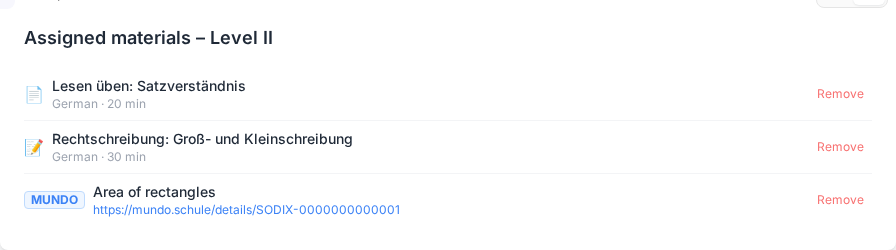
assigned to the competence level or learning group currently selected. From
then on the application treats them like local material: they appear in the
list marked "MUNDO" and are included in the PDF export and in the Common
Cartridge (.imscc) for the learning platform.
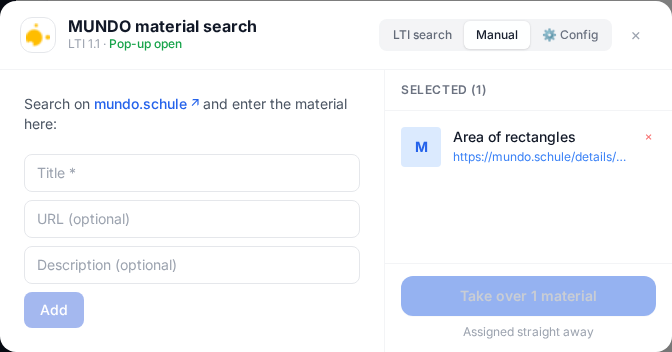
In case LTI is not available there is a second tab. There, the teacher enters the title, address and description of a material found on mundo.schule by hand.
What the prototype simplifies
- The shared secret is in the browser. Anyone who opens the page can read it. In operation the signature belongs on a server. Better still would be LTI 1.3 with Deep Linking, where key pairs replace the shared secret.
- The way back is missing in the public deployment.
/lti-callbackexists in the development server and in the Docker container. Ontba3.vercel.appthe address returns 404 (checked on 14 October 2026), so only manual entry works there. postMessagegoes to any origin ('*'). Acceptable for a demo; in operation the target origin is fixed.- The assignments live in
localStorage. They apply to one device and one browser only.
Why the benefit still remains small
The prototype shortens the second step: a material the teacher has found lands in the right place without copy and paste. It does not shorten the first step, the finding itself.
The request to MUNDO says nothing about what the search is for. It contains
neither the competence level nor the key idea in which the group did poorly,
nor the task many students failed. LTI 1.1 Content-Item Selection has no
field for a search term either. Custom parameters (custom_*) would be
possible, but MUNDO would have to evaluate them. So the teacher faces an empty
search form and has to translate the report into search terms themselves.
For a teacher who knows exactly what they are looking for ("fractions, grade 6, worksheet"), the route is convenient. For the actual question after the report ("what helps a group that is at level II in measuring?") it offers nothing they would not also have in a second browser window.
For the report itself to trigger the search, both sides would have to speak the same language. Today they do not, on either side.
Gap 1: the reports name their competences only as codes
The API provides for competence information: every item carries
competences with type, name, description and id. In the sample data of
the reference server, on which the demo application runs, these fields are
filled as follows:
| Field | Content in the sample data |
|---|---|
domain (sub-area) |
two-letter codes (le, ho, zo, gm, ms …), id always null |
competences[].name |
codes such as 3.3.b, 1.09m, L4, K2 |
competences[].description |
not filled in a single entry |
competences[].id |
always null |
competenceLevel.id |
always null |
So the key idea is there, just as L4. The problem is that such a code only
means something together with its reference system. Looking it up makes this
obvious. In MEM, the notation 3.3 is carried by 39 different standards from
38 competence catalogues, from "Texte erschließen" (German, primary) to
"Wirkung von Katalysatoren" (chemistry). Even the mathematics key ideas are
not unambiguous. The 2004 educational standards count them as L1 to L5
("Leitidee Zahl", "Leitidee Messen" …). The 2022 version numbers them 1 to 5
and draws the lines differently ("Zahl und Operation", "Größen und Messen" …).
The code alone does not say which of the two versions is meant, and the API
sends no description or identifier that could settle it.
Gap 2: the media library is not indexed by educational standards
Even with an unambiguous key idea, MUNDO would find nothing about the key idea. The metadata model the MUNDO interface works with contains these fields: learning resource type, educational level, school type, grade, subject, licence, keywords and author. There is no field for a curriculum, an educational standard, a key idea or a competence. This was checked against the code delivered by mundo.schule on 14 October 2026. Whether SODIX holds more internally than the interface shows has to be confirmed by the SODIX team.
What remains is full-text search over title, description and keywords. A material on lengths and areas is listed under "Flächeninhalt" or "Umfang", hardly under "Leitidee Messen". A search using the key idea as a term therefore produces only chance hits.
Could MEM be the intermediate layer?
MEM (Metadata for Education Media) is an ontology server
of FWU. It models curricula in a shared ontology and can be reached through a
public SPARQL endpoint (sparql.mem.edufeed.org) and an MCP server
(FWU-DE/mem-mcp). The question was
whether MEM can bridge both gaps: codes from the report going in, searchable
terms for the media library coming out.
What MEM provides
Besides the curricula of five states (Bavaria, Saxony, Rhineland-Palatinate,
Brandenburg, Berlin), MEM contains a graph of its own with the KMK
educational standards in the IQB's version
(https://w3id.org/lehrplan/bistas). It comprises about 6,700 concepts as a
SKOS vocabulary, each with a stable address under w3id.org/iqb/, a notation
and a label. The subjects range from German and mathematics through the
foreign languages to the sciences, the levels from primary to upper secondary,
in the 2004 and 2022 versions.
The mathematics key ideas of the sample data are all there:
| Code in the report | Concept in MEM |
|---|---|
L1 |
Leitidee Zahl (number) |
L2 |
Leitidee Messen (measuring) |
L3 |
Leitidee Raum und Form (space and shape) |
L4 |
Leitidee Funktionaler Zusammenhang (functional relationships) |
L5 |
Leitidee Daten und Zufall (data and chance) |
Each of these concepts has its own permanent address in MEM under
w3id.org/iqb/bista04-ma-s1/.
So the vocabulary in which report and material could meet already exists. It is openly accessible, and it comes from the IQB, which also develops the tests.
How far the codes get
For every combination of subject and grade in the sample data, the competence codes were matched against the corresponding catalogues in MEM. The table counts the version with the most hits:
| Subject, grade | Kind | Codes | found in MEM | Version |
|---|---|---|---|---|
| Mathematics 8 | key idea | 5 | 5 | 2004 |
| Mathematics 8 | general competence | 6 | 6 | 2004 |
| Mathematics 8 | competence | 31 | 0 | – |
| Mathematics 3 | competence | 47 | 27 | 2004 |
| German 8 | competence | 19 | 14 | 2004 |
| German 3 | competence | 11 | 0 | – |
The coarse levels (key idea, general competence) can be resolved as soon as
the version is known. The fine item codes (1.09m, 3.3.i) follow, in two
cases, a numbering that does not occur in the published standards. Where they
were found, only the notation matches so far. Whether the same standard is
meant was not checked.
What the bridge lacks
Report               MEM                          Media library
──────               ───                          ─────────────
"L2"  ──── ✗ ────▶   Leitidee Messen      ──── ✗ ────▶   material
         version     w3id.org/iqb/…                indexing
         missing                                   missing
- The report has to say which concept is meant. The field for it already
exists:
competences[].idis part of the specification and is empty today. If it carried thew3id.org/iqb/…address, the first gap would be closed without changing the API. This concerns test development and the specification inindibit-eu/tba3, not the front end. - The material has to be indexed with the same concepts. MEM does not help here. The ontology describes curricula and standards but does not link them to media. As long as MUNDO materials carry no educational standards, even the best address finds nothing. This is the expensive part: an editorial or machine-assisted re-indexing of the collection.
- In MEM there is no path from a standard to a state curriculum. No curriculum of the five states refers to an educational standard there. If material is indexed by state curriculum, this detour does not lead from the report to the material either.
What MEM could do today
One thing can be improved even without the two missing parts: MEM turns the codes into words. Instead of "L2" the application shows "Leitidee Messen" and can offer the teacher the labels of the standards below it as search suggestions. That turns the empty search form into a pre-filled one. For this to work, the application has to know the version (fixed per test), and MUNDO has to accept a search term at launch. The search becomes more accurate only as far as full-text search reaches. It remains an aid for phrasing the search, not an assignment.
What follows
- As a convenience feature the integration is worth it. Anyone searching for something specific saves copying, and the material ends up in the export. For operation, the signature belongs on a server and the way back must also work in the public deployment.
- "Matching material for the report" should not be promised as long as both gaps are open. A button that looks like a recommendation and opens an empty search form disappoints the first time.
- The cheapest lever is on the report side: fill
competences[].idwith the IQB address. It costs little, the field already exists, and every later connection to a media library, to MEM or to the materials draft benefits. - The expensive lever is with the media library: index material by educational standards. Without this step, any intermediate layer has nothing to connect to.
- The materials draft avoids both gaps.
/materialsattaches material directly to an item, a competence or a level, at the place where the test is made. Then nothing has to be searched, because the assignment was already made when the test was created. The demo application shows this route in the third mode of the "Learning materials" tab, next to the MUNDO route.