Die Rezepte zur Schnittstelle beantworten, welche Anfrage zu welcher Frage passt. Hier steht die andere Hälfte: was eine Oberfläche mit den Antworten macht. Die Beispiele stammen aus der Demoanwendung dieses Repositories, beschreiben aber Muster und keine Komponenten — nachbauen lässt sich jedes davon in einer fremden Anwendung.
Dieses Dokument gehört zu dieser Seite und wird hier gepflegt, nicht in
indibit-eu/tba3.
Individualergebnisse zeigen, ohne Namen zu zeigen: der Observer-Modus
Die Lage
Auswertungen auf Individualebene werden selten allein gelesen. Sie liegen in der Klassenkonferenz auf dem Beamer, sie gehen in einer Bildschirmfreigabe durch eine Videokonferenz, sie stehen in einem Screenshot an einem Fehlerbericht — und jemand schaut mit, der zu den Zahlen befugt ist, aber nicht zu den Namen dahinter.
Die naheliegende Antwort — in solchen Lagen eben keine Individualebene zeigen — beendet das Gespräch, bevor es anfängt. Wer über Förderbedarf spricht, braucht die einzelne Zeile; die Verteilung über die Gruppe sagt darüber nichts. Gesucht ist also nicht weniger Inhalt, sondern derselbe Inhalt ohne den Namen.
Der Schalter
Im Kopf der Demoanwendung sitzt dafür ein Schalter mit einem Auge, beschriftet mit
„Namen“ bzw. „Observer“ (apps/demo/src/components/layout/Header.jsx). Ein Klick
legt die ganze Anwendung um — nicht eine einzelne Ansicht, denn der Beamer zeigt
auch die nächste.
Der Zustand liegt neben den Filtern im FilterContext
(apps/demo/src/context/FilterContext.jsx), weil jede Ansicht, die Namen zeigt,
ohnehin schon an diesem Kontext hängt:
const { observerMode } = useFilters();

<span className={observerMode ? 'blur select-none' : ''}>
  {student.firstName} {student.lastName}
</span>
Zwei Klassen, nicht eine: blur zeichnet weich, select-none verhindert, dass man
den unleserlichen Namen mit der Maus markiert und in die Zwischenablage zieht.
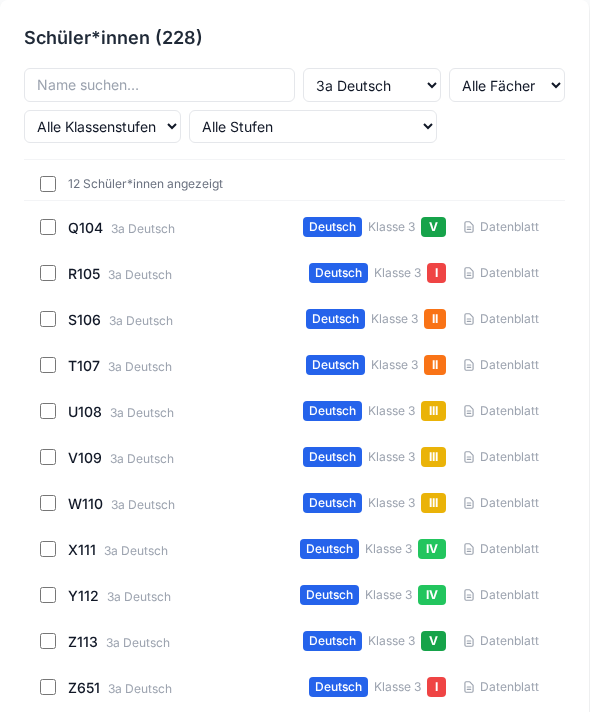
Was verdeckt wird
| Ort | im Normalfall | im Observer-Modus |
|---|---|---|
| Schülerliste | Vor- und Nachname | weichgezeichnet |
| Mitgliederliste einer eigenen Gruppe | Vor- und Nachname | weichgezeichnet |
| Auswahlliste im Gruppeneditor | Vor- und Nachname | weichgezeichnet |
| Datenblatt (Modal und Vollansicht) | Name als Überschrift | weichgezeichnet |
| Schüler-Karte, Punktbeschriftung | Initialen (AM) |
•• |
| Schüler-Karte, Tooltip | Name | weichgezeichnet |
Die Punktbeschriftung ist der Fall, an dem der einfache Weg nicht reicht: zwei
Initialen sind auch weichgezeichnet noch zwei Zeichen an einer bekannten Stelle,
und in einer Klasse von zwölf sind sie damit so gut wie der Name. Deshalb werden
sie ersetzt statt verwischt (StudentMapCard.jsx) — wo die Verdeckung wenig
Material hat, muss sie das Material wegnehmen.
Was mit Absicht stehen bleibt
Klasse, Fach, Klassenstufe, Kompetenzstufe und die Kovariaten bleiben lesbar. Das ist der Punkt der Übung: verdeckt wird die Person, nicht das Ergebnis.
Damit ist auch gesagt, wogegen der Modus nicht schützt. Wer die Klasse kennt, kann aus Klasse, Geschlecht und Sprache zu Hause oft genug auf die Person schließen — in einer Gruppe von zwölf reicht manchmal eine Kovariate. Der Observer-Modus schützt gegen den Blick von jemandem, der die Gruppe nicht kennt: gegen den Beamer im vollen Raum, die Bildschirmfreigabe, den Screenshot. Gegen die Kollegin, die die Klasse unterrichtet, schützt keine Unkenntlichmachung, die die Ergebnisse stehen lässt.
Was der Modus nicht leistet
- Der Name steht weiter im DOM.
blurist ein Darstellungsfilter, keine Schwärzung: in der Entwicklerkonsole, im Quelltext der Seite und für Vorlesesoftware ist der Name unverändert da. Das ist die Grenze zwischen „nicht sichtbar“ und „nicht vorhanden“, und der Modus liegt auf der ersten Seite. - Der Export trägt den Klarnamen. Das PDF einer Einzelrückmeldung schreibt
Name und Dateinamen unverändert (
apps/demo/src/utils/studentPdfExport.js), auch bei eingeschaltetem Observer-Modus. Vertretbar ist das, weil eine Rückmeldung an die Person selbst geht und ein namenloses PDF dort nutzlos wäre — eine ausdrückliche Entscheidung ist es bisher nicht. Wer das Muster übernimmt, trifft sie besser bewusst. - Der Schalter überlebt kein Neuladen. Er liegt in
useStateund nicht in der Adresszeile: nachF5stehen die Namen wieder da, und ein geteilter Deeplink trägt den Modus nicht mit. Für einen Schalter, der im Gespräch umgelegt wird, ist das brauchbar; als Voreinstellung einer Rolle „Beobachter“ wäre es zu wenig.
Wo die Grenze wirklich liegt
Beim liefernden System. Die Schnittstelle verlangt keinen Klarnamen: name an der
Wertegruppe heißt in der Spezifikation „Bezeichnung der Wertegruppe“, und das
Beispiel dort ist bereits Schüler 1. Ob eine Antwort mit type=students einen
Namen, ein Kürzel oder ein Pseudonym trägt, entscheidet also die Stelle, die sie
ausliefert — nicht die Oberfläche, die sie anzeigt. Zu den Wertegruppen und zu
type siehe die Endpunkt-Referenz.
Die Demoanwendung selbst hat gar keine echten Namen: sie erfindet sie deterministisch
im Browser (apps/demo/src/utils/studentData.js), damit eine Oberfläche mit Namen
überhaupt zu sehen ist. Der Observer-Modus schützt hier also nichts — er zeigt ein
Muster, das in einer echten Anwendung etwas zu schützen hätte.
Daraus folgt die Reihenfolge für ein echtes Vorhaben:
- Liefere keine Namen, wo keine gebraucht werden — die Pseudonymisierung gehört ins Backend, nicht in ein CSS-Filter.
- Zeige die Namen nur dort, wo die Rolle sie braucht (die Klassenleitung braucht sie, die Schulaufsicht nicht).
- Und für die Momente, in denen jemand mitschaut, gibt es zusätzlich einen Schalter wie diesen.
Der Observer-Modus ist Schritt 3. Er ersetzt die Schritte 1 und 2 nicht.
Nachbauen
Drei Zutaten, unabhängig vom Framework:
- Ein Merker an einer Stelle, die jede Ansicht schon kennt — Kontext, Store, was die Anwendung eben hat. Pro Ansicht ein eigener Schalter wäre falsch: wer ihn umlegt, will ihn überall umgelegt haben.
- Eine Regel, was er trifft. Die kurze Fassung: den Namen, sonst nichts. Alles andere ist Ergebnis und soll lesbar bleiben.
- Eine Sonderbehandlung für Kurzformen. Initialen, Kürzel, Avatare mit Buchstaben — überall dort, wo wenig Zeichen an einer festen Stelle stehen, ersetzen statt weichzeichnen.
Und eine vierte, die leicht vergessen wird: ein Test, der beides prüft — dass der
Name verdeckt ist und dass das Ergebnis daneben noch dasteht. In diesem
Repository tut das e2e/demo-schueler.spec.js gegen den ausgelieferten Stand.
Eine Rückmeldung, die das Haus verlässt: der PDF-Export
Die Lage
Eine Auswertung, die nur im Browser steht, hilft in der Elternsprechstunde nicht und im Ordner der Klassenleitung auch nicht. Irgendwann muss etwas herausfallen, das man ausdrucken, weiterreichen und ablegen kann — und das ohne die Anwendung noch lesbar ist.
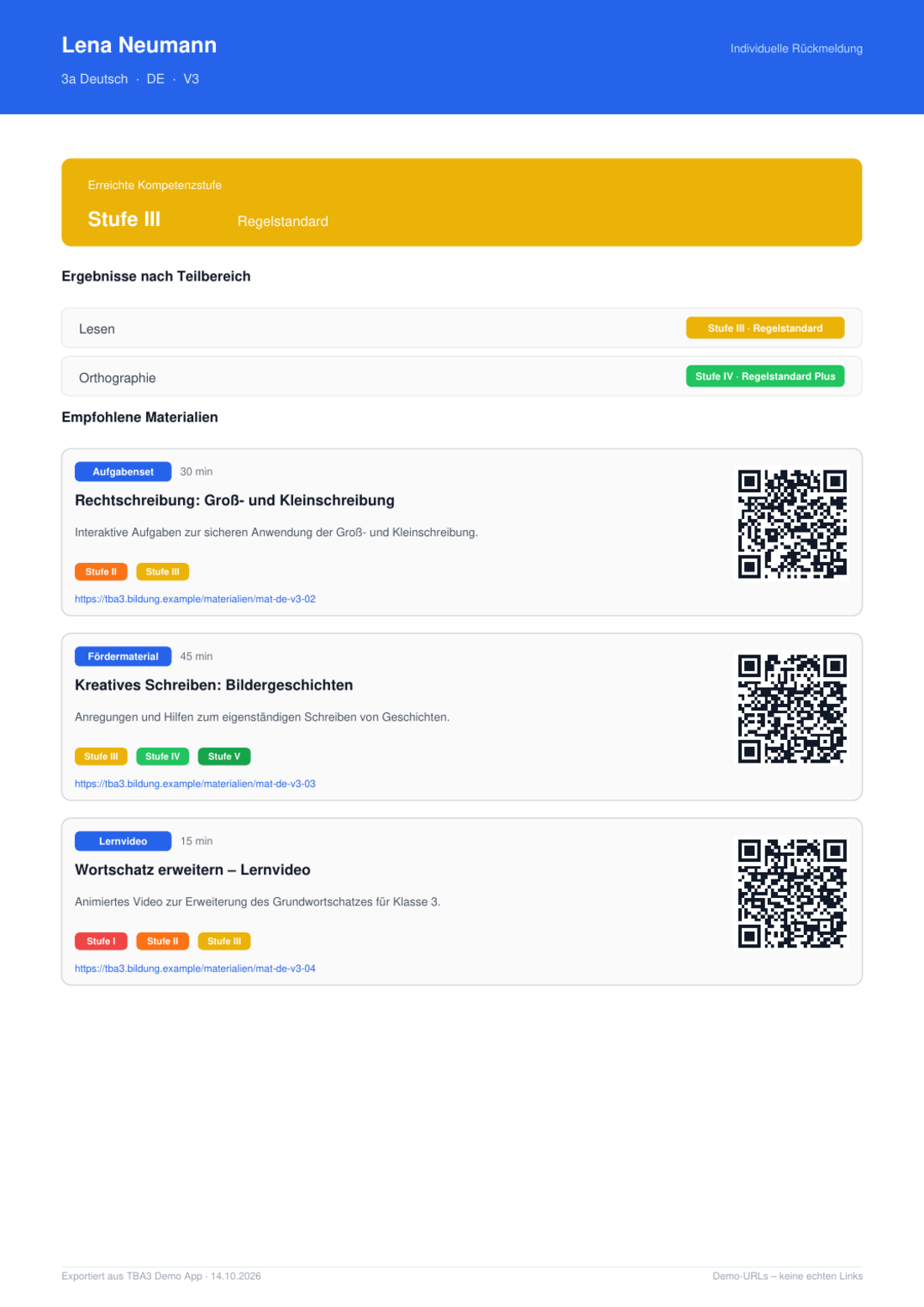
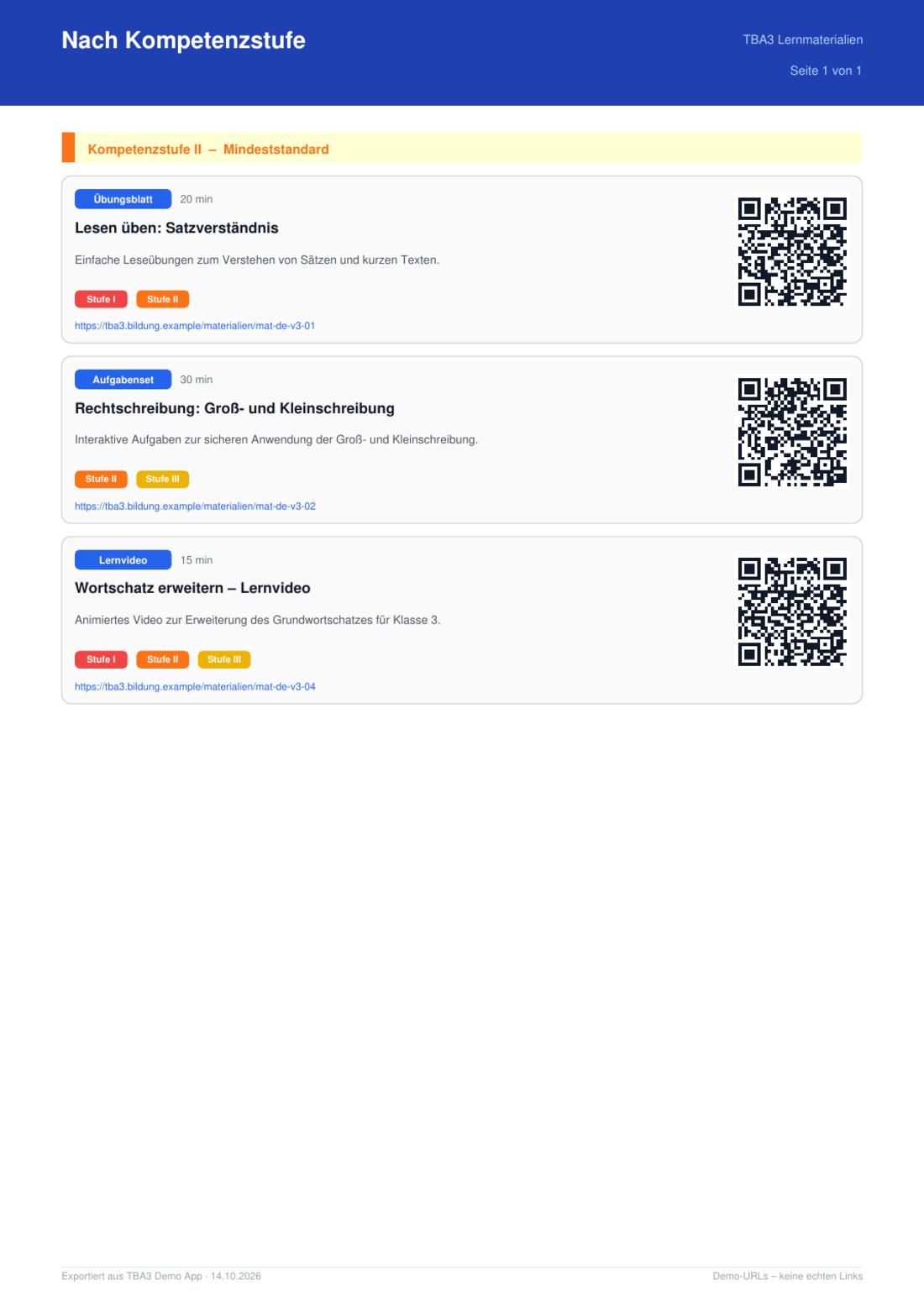
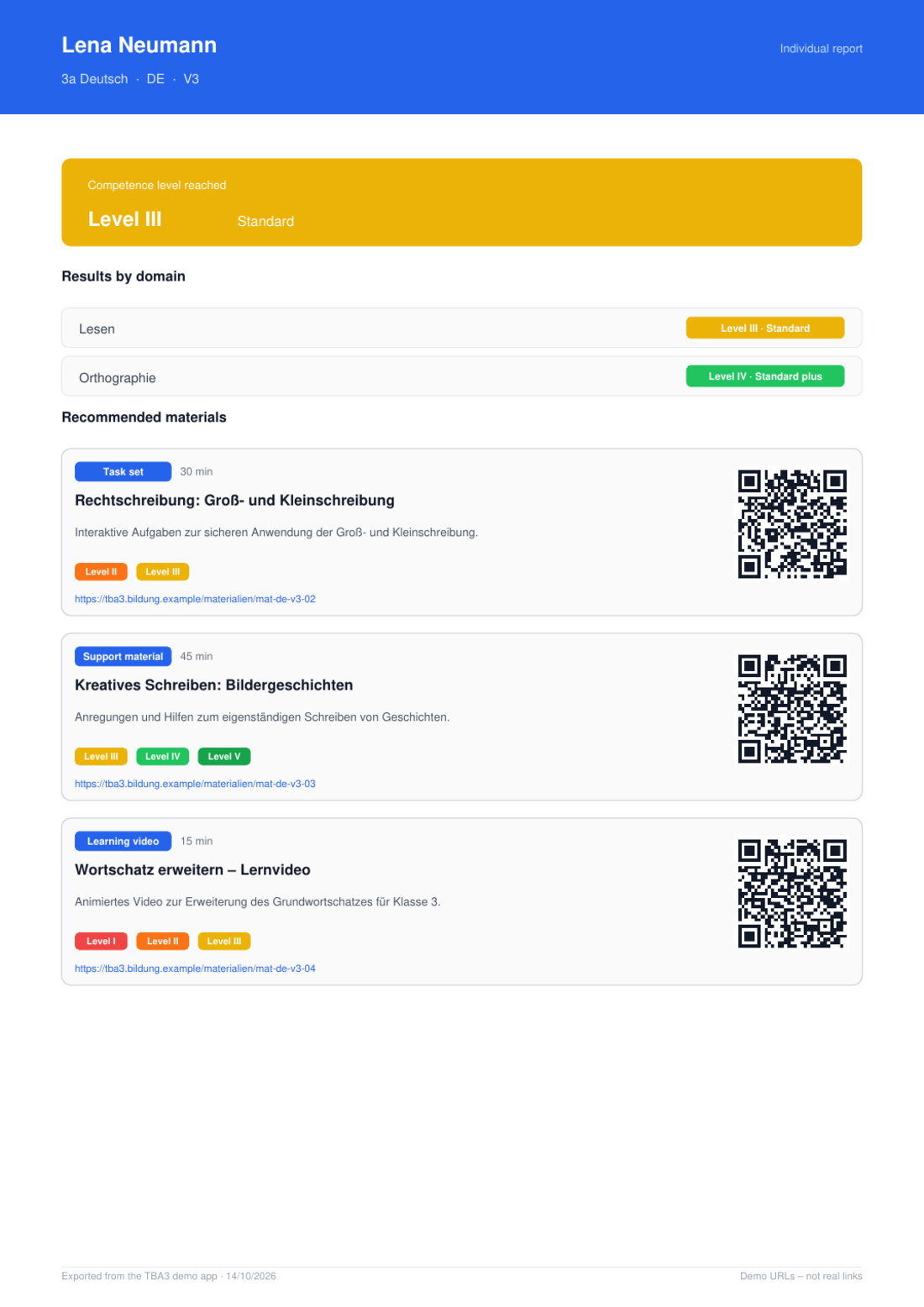
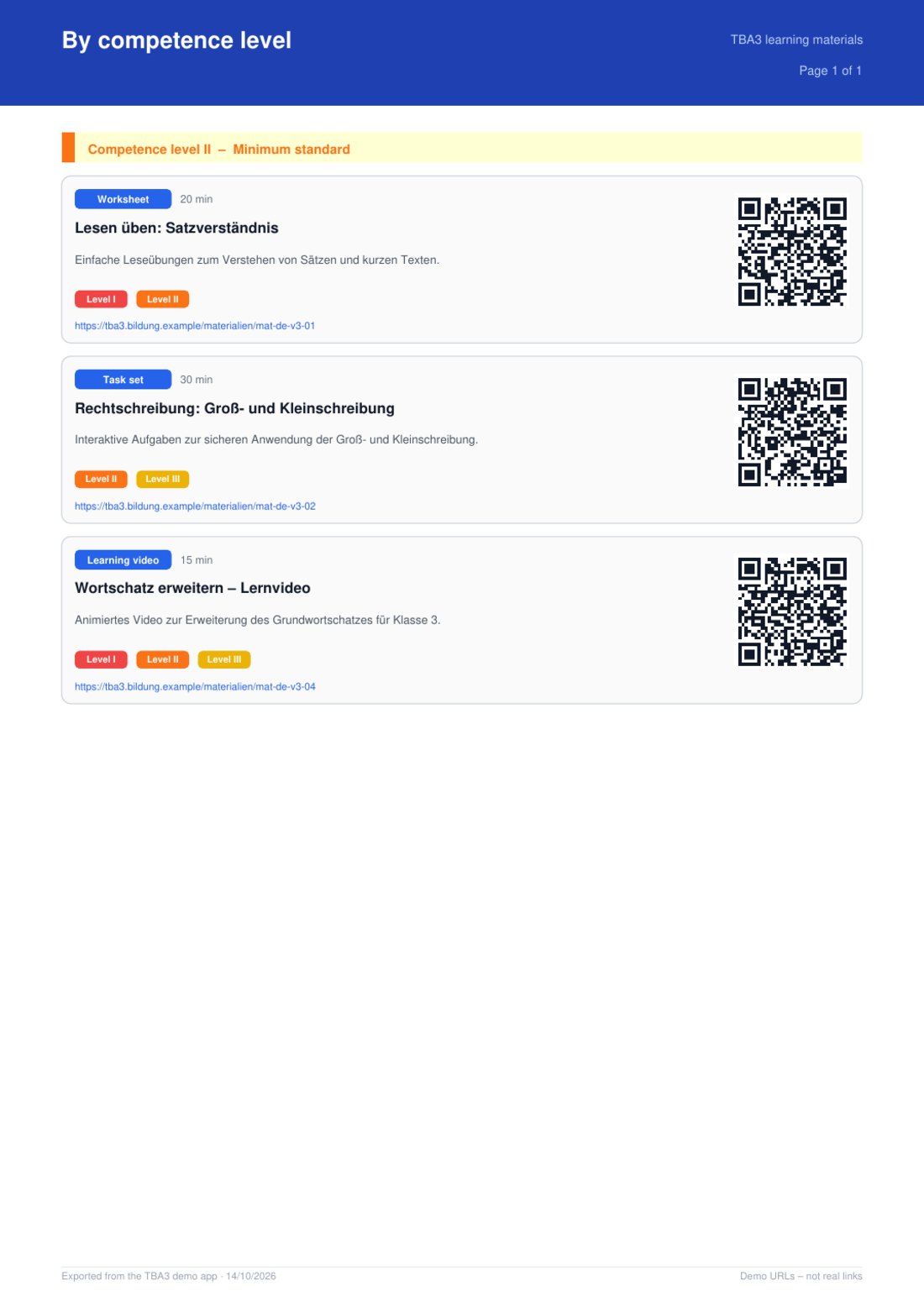
Die Demoanwendung erzeugt zwei PDFs. Sie sehen gleich aus, weil sie dieselben Zeichenhelfer benutzen, beantworten aber verschiedene Fragen:
| individuelle Rückmeldung | Materialzuordnung | |
|---|---|---|
| Auslöser | Knopf im Datenblatt einer Person | Knopf in der Materialansicht |
| Modul | studentPdfExport.js |
pdfExport.js |
| Umfang | eine Seite je Person | eine Seite je Gruppe, plus Trennseiten |
| Inhalt | erreichte Stufe, Ergebnisse nach Teilbereich, empfohlene Materialien | zugewiesene Materialien nach Kompetenzstufe |
| Dateiname | Rueckmeldung_{Nachname}_{Vorname}.pdf |
tba3_{Gruppe}_{Datum}.pdf |
Daneben steht derselbe Stoff als Common Cartridge (.imscc,
commonCartridgeExport.js) — für das Lernmanagementsystem statt für den Drucker.
Das PDF ist die Ausgabe für Menschen, die Cartridge die für Maschinen; wer nur
eine von beiden baut, baut fast sicher die falsche.
Alles im Browser, nichts auf einem Server
Beide Ausgaben entstehen im Browser. Kein Byte der Rückmeldung geht dafür an einen Dienst, es gibt keinen Export-Endpunkt und keine Zwischenablage auf fremder Infrastruktur — was das Gerät verlässt, ist die Datei im Download-Ordner.
Das ist keine Nebensache, sondern der Grund, warum diese Bauweise für Individualdaten überhaupt in Frage kommt. Ein serverseitiger PDF-Dienst müsste Namen und Ergebnisse entgegennehmen, und damit begänne eine ganz andere Diskussion — Auftragsverarbeitung, Aufbewahrung, Löschfristen. Wer den Export später doch auf einen Server zieht, verschiebt nicht nur Rechenlast.
Geladen wird erst beim Klick
jsPDF ist groß. Deshalb kommt es nicht in das Bündel, das beim Start geladen wird, sondern erst, wenn jemand wirklich exportiert:
const handleDownloadPDF = async () => {
  setPdfLoading(true);
  try {
    const { exportStudentPDF } = await import('../../utils/studentPdfExport');
    await exportStudentPDF(student);
  } finally {
    setPdfLoading(false);
  }
};
Die Größenordnung: das Hauptbündel der Demoanwendung liegt bei rund 870 KB, der nachgeladene Brocken mit jsPDF und dem QR-Erzeuger bei rund 410 KB, der für die Common Cartridge bei rund 100 KB. Statisch eingebunden wüchse der erste Seitenaufruf also um gut die Hälfte — für eine Funktion, die die meisten Besuche nie anfassen.
Das finally gehört dazu: ohne es bliebe der Knopf nach einem Fehler für immer
im Ladezustand.
Ein nachgeladener Brocken bringt eine eigene Fehlerquelle mit — er kann im Build
fehlen oder unter einem falschen Pfad liegen, und beides fällt in der Entwicklung
nicht auf. Die E2E-Tests warten deshalb auf das Download-Ereignis
(e2e/demo-schueler.spec.js, e2e/demo-materialien.spec.js): eine Datei, die
ankommt, ist zugleich der Nachweis, dass der Brocken ausgeliefert wird.
Die Sprache wird beim Klick geholt, nicht beim Laden des Moduls
Die beschrifteten Konstanten stehen auf Modulebene, werden aber zu Beginn jedes Exports neu geholt:
let { COMPETENCE_LEVELS, GRADES, SUBJECTS } = konstantenJetzt();

export const exportStudentPDF = async (student) => {
  ({ COMPETENCE_LEVELS, GRADES, SUBJECTS } = konstantenJetzt());
  // …
};
Das sieht nach doppelter Arbeit aus und ist der Kern der Sache: das Modul wird
beim ersten Export geladen, die Sprache kann danach noch umgeschaltet werden.
Ohne die zweite Zeile stünde im PDF die Sprache, die beim ersten Klick galt —
und niemand käme auf die Idee, das dem Modul-Ladezeitpunkt zuzuschreiben. Alles,
was außerhalb einer Komponente übersetzt wird, ruft uebersetze() deshalb beim
Aufruf statt beim Import.
Was die Standardschrift kann — und was nicht
jsPDF bringt die 14 Standardschriften von PDF mit; benutzt wird Helvetica. Die deckt Westeuropa ab: Umlaute, Akzente, das ß stehen richtig da. Emoji stehen nicht da, sondern als Müll — und die Materialarten der Demoanwendung tragen in der Oberfläche welche.
Deshalb geht jede Zeichenkette durch safe(), bevor sie ins PDF kommt:
export const safe = (str) =>
  String(str ?? '').replace(
    /[\u{1F000}-\u{1FFFF}]|[\u{2600}-\u{27BF}]|[\u{FE00}-\u{FE0F}]|\u{FEFF}/gu,
    ''
  ).trim();
Das ist die billige Lösung und für diesen Zweck die richtige: Emoji sind hier
Schmuck. Sobald aber Namen ins Spiel kommen, die nicht in WinAnsi passen —
kyrillisch, griechisch, türkisches ı, polnisches ł —, hilft Wegwerfen nicht mehr,
denn dann wirft man den Namen weg. Dann führt kein Weg an einer eingebetteten
Schrift vorbei (pdf.addFileToVFS und pdf.addFont), und das Bündel wächst um
die Schriftdatei. Für ein Vorhaben mit echten Schülerdaten ist das die
Voreinstellung, nicht die Ausnahme.
QR-Codes vorab, weil das Zeichnen synchron ist
Jede Materialkarte trägt einen QR-Code. Die Erzeugung ist asynchron, das Setzen
ins PDF nicht — pdf.addImage nimmt keine Zusage entgegen. Also werden die Codes
erzeugt, bevor die Zeichenschleife beginnt:
const qrCodes = await Promise.all(
  materialien.map((m) => generateQR(m.url || getMaterialUrl(m)).catch(() => null))
);
Zwei Entscheidungen in zwei Zeilen: alle auf einmal statt nacheinander, und ein
catch, das null liefert. Ein QR-Code, der nicht zustande kommt, lässt die
Karte ohne Bild — er lässt nicht den ganzen Export scheitern. Bei einem Vorgang,
den jemand angestoßen hat und auf dessen Ergebnis er wartet, ist die Teilausgabe
fast immer besser als die Fehlermeldung.
Wohin die Codes zeigen, ist in der Demoanwendung ausdrücklich nichts:
https://tba3.bildung.example/materialien/{id} ist eine Platzhalteradresse, und
die Fußzeile jeder Seite sagt es — „Demo-URLs – keine echten Links“. Eine
Papierausgabe überlebt ihren Anlass um Jahre; ein toter Link darin, der nicht als
solcher gekennzeichnet ist, schickt jemanden in die Irre, der die Herkunft des
Blattes längst vergessen hat.
Der Seitenumbruch wird selbst gerechnet
jsPDF hat keinen Textfluss. Es gibt einen Zeiger y, und wer zeichnet, schiebt
ihn weiter. Ob der nächste Block noch auf die Seite passt, muss vor dem
Zeichnen geprüft werden:
if (y + CARD_H > PAGE_H - 16) {
  drawFooter(pdf, datum);
  pdf.addPage();
  y = MARGIN;
}
drawMaterialCard(pdf, material, y, qrCodes[i]);
y += CARD_H + 4;
Die Fußzeile wird dabei auf der alten Seite gezogen, bevor die neue beginnt.
Wer sie am Ende in einem Rutsch setzen will, muss alle Seiten noch einmal
durchgehen — und vergisst die letzte. Die Blockhöhen stehen deshalb als
Konstanten (CARD_H, LEVEL_BAR_H, HEADER_H) und nicht als Zahlen im
Zeichencode: eine Kartenhöhe, die an zwei Stellen gepflegt wird, bricht die Seite
irgendwann an der falschen Stelle um.
Was der Export nicht tut
- Der Observer-Modus greift nicht. Die individuelle Rückmeldung trägt den Klarnamen im Kopf und im Dateinamen, auch wenn die Oberfläche gerade alle Namen weichzeichnet. Für eine Rückmeldung an die Person selbst ist das richtig — ein namenloses Blatt ließe sich nicht zuordnen. Als stille Ausnahme von einem Schutz, den man eingeschaltet hat, ist es trotzdem eine Entscheidung, die ausdrücklich getroffen gehört; siehe Observer-Modus.
- Geprüft wird die Datei, nicht ihr Inhalt. Die E2E-Tests belegen, dass ein Klick eine PDF-Datei mit dem erwarteten Namen liefert. Ob die richtige Kompetenzstufe darin steht, prüft kein Test — dafür müsste man das PDF wieder auslesen. Wer den Inhalt absichert, tut das am besten eine Ebene tiefer, an den Funktionen, die die Werte aufbereiten.
- Es gibt keine Vorschau. Der Klick erzeugt die Datei und stößt den Download an; was darin steht, sieht man erst im Betrachter.
Nachbauen
- Erst beim Klick laden. Eine PDF-Bibliothek gehört nicht in das Bündel, das jeder Besuch zahlt.
- Übersetzen beim Aufruf, nicht beim Import. Sonst friert die Ausgabe die Sprache des ersten Klicks ein.
- Schrift vor Inhalt klären. Welche Zeichen im Dokument vorkommen können, entscheidet, ob die Standardschrift reicht — und diese Frage stellt man vor dem ersten Layout, nicht nach dem ersten Bericht über kaputte Namen.
- Alles Asynchrone vor die Zeichenschleife. Bilder, QR-Codes, nachgeladene Daten — die Schleife selbst bleibt synchron und damit lesbar.
- Teilausgabe schlägt Fehlermeldung. Was schmückt, darf fehlen; was trägt, muss da sein.
Ein Assistent, der die Auswertung lesen kann: der MCP-Server
Pilot, kein Produkt. Was hier steht, ist im Rahmen der Machbarkeitsstudie entstanden und beantwortet eine Frage — geht das überhaupt, und was wäre dafür nötig? — und keine andere. Es ist keine Empfehlung für den Betrieb, kein Bestandteil der Schnittstelle und nichts, worauf sich ein Vorhaben stützen sollte, ohne die Fragen im Abschnitt „Was ein echter Betrieb lösen müsste“ vorher beantwortet zu haben.
Wie das für Lehrkräfte aussieht, zeigt das Teilkonzept Ein Assistent, der die Auswertung lesen kann mit drei Gesprächen als Mockup.
Die Idee
Eine Auswertungsschnittstelle beantwortet die Fragen, die jemand beim Entwurf der Oberfläche vorhergesehen hat. „Welche Aufgabenformate liegen in 8b unter dem Landesschnitt, und gibt es dazu Material?“ ist keine davon — die Frage kreuzt drei Endpunkte und einen Katalog, und für jede solche Kreuzung eine Ansicht zu bauen, hört nie auf.
Das Model Context Protocol dreht die Richtung um: statt die Frage vorwegzunehmen, beschreibt man dem Sprachmodell die verfügbaren Abfragen, und es setzt sie zusammen. Der Pilot prüft, ob sich die TBA3-Endpunkte so beschreiben lassen, dass dabei etwas Brauchbares herauskommt.
Was der Server anbietet
Sieben Werkzeuge (mcp-server/server-impl.js). Wie man sie startet, einbindet
und welche Umgebungsvariablen es gibt, steht im README des Pakets; hier steht,
was dahintersteckt:
| Werkzeug | dahinter |
|---|---|
tba3_list_entities |
Schulen, Lerngruppen, Bundesländer — fest eingebaut, nicht aus der Schnittstelle |
tba3_list_subjects |
die vier Fächer |
tba3_list_grades |
Klasse 3 und Klasse 8 |
tba3_get_competence_levels |
GET /{ebene}/{id}/competence-levels |
tba3_get_aggregations |
GET /{ebene}/{id}/aggregations |
tba3_get_items |
GET /{ebene}/{id}/items |
tba3_list_materials |
ein fest eingebauter Materialkatalog, kein Endpunkt |
Vier beantworten „was gibt es?", drei „wie sieht es aus?". Die Trennung ist der
Grund, warum das Ganze überhaupt funktioniert: ein Modell, das eine Kennung wie
8b-mathe raten muss, rät — und zwar plausibel und falsch. Die drei
get-Werkzeuge reichen an die Schnittstelle durch, jedes mit entityType,
entityId und dem type-Parameter.
Die Hilfe-Ansicht der Demoanwendung führt dieselben sieben in einer eigenen
Tabelle. Zwei Listen, die auseinanderlaufen können, sind eine zu viel — wer den
Server erweitert, denkt an die Ansicht in
apps/demo/src/components/HelpView.jsx mit.
Zwei Wege hinein
Derselbe Server (createMcpServer()), zwei Transporte:
- stdio (
index.js) — der Weg für eine Entwicklungsumgebung auf demselben Rechner. Der Client startet den Prozess selbst, es gibt keinen Port und keine Netzwerkgrenze. - Streamable HTTP (
server-http.js) — der Weg für ein Deployment.POST /mcp, bewusst ohne Sitzung (sessionIdGenerator: undefined): je Anfrage entsteht eine Server-Instanz, die danach wieder verschwindet. Das macht den Dienst beliebig vervielfachbar und heißt zugleich, dass er sich nichts merkt — auch nichts, woran er einen Aufrufer wiedererkennen könnte.
Dass der Kern von beidem nichts weiß, ist die eigentliche Arbeit an dieser Aufteilung: die Werkzeuge werden einmal beschrieben, und welcher Transport sie trägt, entscheidet die Betriebsart.
Wo er läuft — und wo nicht
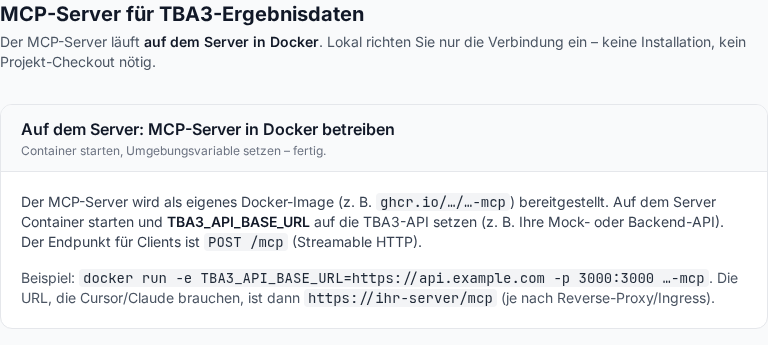
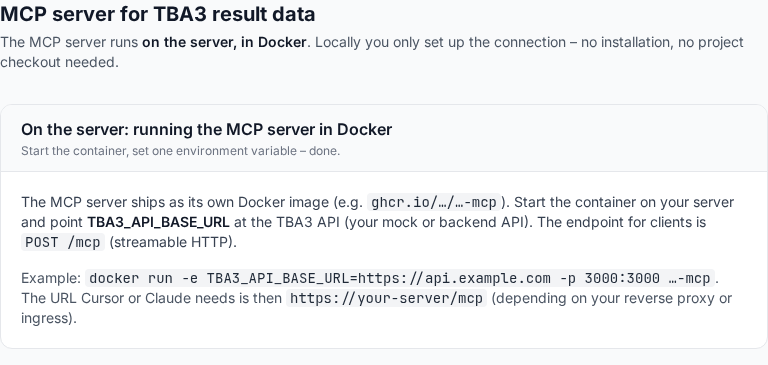
Im Docker-Abbild: docker-entrypoint.sh startet ihn auf Port 3000, nginx
reicht /mcp dorthin durch, TBA3_API_BASE_URL zeigt standardmäßig auf den Mock
im selben Container. Das Abbild wird zusätzlich einzeln gebaut
(ghcr.io/FWU-DE/tba3-demo-app-mcp), damit man den Server ohne die Seite
betreiben kann.
Nicht auf dem öffentlichen Deployment: vercel.json kennt keine Route /mcp,
und eine Funktion, die MCP spräche, gibt es dort nicht. Die Hilfe-Ansicht fragt
deshalb beim Öffnen unter /mcp derselben Seite nach. Antwortet dort niemand
(404), sagt sie das und zeigt in den Beispielen eine Platzhalteradresse; im
Container steht dort die echte. VITE_MCP_HTTP_URL legt die Adresse beim Bauen
fest. Wer den Pilot vorführt, führt ihn aus dem Container vor.
Was ein echter Betrieb lösen müsste
Der Pilot beantwortet die technische Frage mit ja. Die Fragen, die er offenlässt, sind die schwereren — und sie sind nicht Restarbeit, sondern Vorarbeit:
- Es gibt keine Authentifizierung. Wer
/mcperreicht, erreicht jede Lerngruppe, jede Schule, jedes Land. Der Pilot steht hinter nichts als der Erreichbarkeit seines Containers. - Es gibt keinen Aufrufer. Der Server spricht die Schnittstelle ohne jede Identität an. Er könnte also gar nicht auf „Ihre Klasse“ einschränken, selbst wenn er wollte — eine Rollen- und Rechteschicht fehlt nicht, sie ist nicht vorgesehen.
- Individualdaten gehen an ein Sprachmodell. Alle drei Datenwerkzeuge nehmen
type=studentsentgegen. Was dann zurückkommt, geht an den Client und damit an das Modell dahinter — je nach Einsatz an einen fremden Dienst. Das ist die Entscheidung, die vor der ersten Zeile Code gehört, nicht nach dem Prototyp; siehe Observer-Modus, wo dieselbe Grenze von der anderen Seite beschrieben ist. - Der Server ist ungetestet.
mcp-server/ist bewusst kein Workspace — eigener Lockfile, eigener Docker-Kontext — und hängt damit auch nicht annpm test. Für einen Pilot vertretbar; für einen Dienst, der Ergebnisdaten herausgibt, nicht. - Das Verzeichnis ist eingebaut, nicht abgefragt. Lerngruppen, Schulen,
Fächer, Jahrgänge und der Materialkatalog stehen in
server-impl.js. Für den Pilot ist das richtig und im README auch begründet: ein Werkzeug, das erst eine Anfrage stellen muss, um sagen zu können, welche Anfragen möglich sind, hilft niemandem. Offen bleibt trotzdem, woher ein echter Server das Verzeichnis nähme — die Schnittstelle kennt keinen Endpunkt, der Lerngruppen aufzählt, und für einen Aufrufer ohne Identität wäre die Antwort darauf auch nicht eindeutig.
Was sich daraus mitnehmen lässt
Unabhängig davon, ob am Ende ein MCP-Server steht:
- Nachschlagewerkzeuge zuerst. Ein Modell, das Kennungen raten muss, rät. Die drei Listenwerkzeuge kosten wenig und ändern die Trefferquote deutlich.
- Ein Werkzeug je Endpunkt, nicht ein Werkzeug je Frage. Die Fragen kommen ohnehin anders, als man sie vorwegnimmt — das war ja der Anlass.
- Den Kern vom Transport trennen. Was die Werkzeuge tun, hat mit stdio oder HTTP nichts zu tun, und getrennt lässt sich beides betreiben.
- Die Datenschutzfrage steht am Anfang, nicht am Ende. Ein Prototyp, der Individualdaten schon herausgibt, hat die Entscheidung stillschweigend getroffen.
Das Handwerkliche — Starten, Umgebungsvariablen, Einbinden in Claude Code oder Cursor, das Abbild aus der CI — steht im README des MCP-Pakets.
The recipes for the interface answer which request fits which question. This is the other half: what a user interface does with the answers. The examples come from this repository's demo application, but they describe patterns, not components — each of them can be rebuilt in another application.
This document belongs to this site and is maintained here, not in
indibit-eu/tba3.
Showing individual results without showing names: observer mode
The situation
Analyses at the individual level are rarely read alone. They are on the projector in the class conference, they go through a video call as a shared screen, they sit in a screenshot attached to a bug report — and someone is watching who is authorized to see the numbers, but not the names behind them.
The obvious answer — just don't show the individual level in such situations — ends the conversation before it starts. Anyone discussing support needs needs the individual row; the distribution across the group says nothing about that. So what is needed is not less content, but the same content without the name.
The toggle
For this, the header of the demo application has a toggle with an eye, labeled
“Names” or “Observer” (apps/demo/src/components/layout/Header.jsx). One click
switches the entire application — not a single view, because the projector shows
the next one too.
The state lives next to the filters in FilterContext
(apps/demo/src/context/FilterContext.jsx), because every view that shows names
already depends on that context:
const { observerMode } = useFilters();

<span className={observerMode ? 'blur select-none' : ''}>
  {student.firstName} {student.lastName}
</span>
Two classes, not one: blur softens the text, select-none keeps anyone from
selecting the illegible name with the mouse and dragging it to the clipboard.
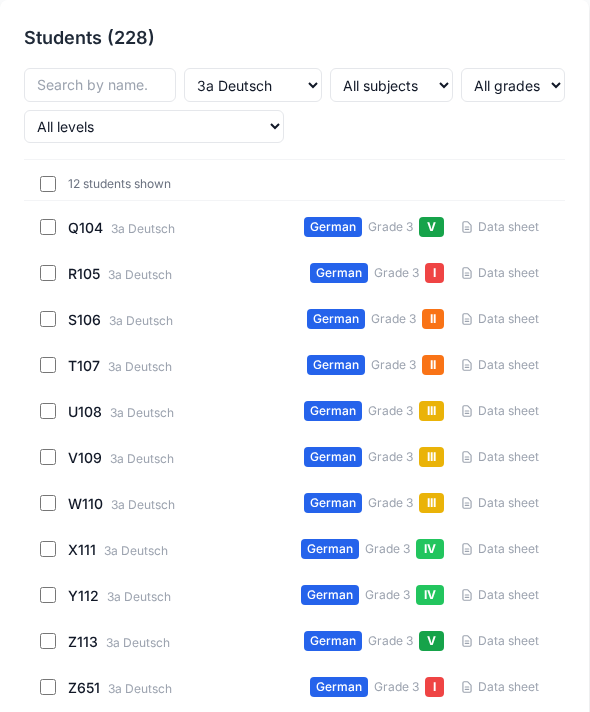
What gets hidden
| Place | normally | in observer mode |
|---|---|---|
| Student list | first and last name | blurred |
| Member list of a custom group | first and last name | blurred |
| Selection list in the group editor | first and last name | blurred |
| Data sheet (modal and full view) | name as heading | blurred |
| Student map, point label | initials (AM) |
•• |
| Student map, tooltip | name | blurred |
The point label is the case where the simple approach is not enough: even
blurred, two initials are still two characters in a known position, and in a
class of twelve that is as good as the name. So they are replaced instead of
blurred (StudentMapCard.jsx) — where the masking has little material to work
with, it has to take the material away.
What stays visible on purpose
Class, subject, grade, competence level, and the covariates stay readable. That is the point of the exercise: what is hidden is the person, not the result.
This also says what the mode does not protect against. Anyone who knows the class can often infer the person from class, gender, and language spoken at home — in a group of twelve, one covariate is sometimes enough. Observer mode protects against the gaze of someone who does not know the group: against the projector in a full room, the shared screen, the screenshot. No anonymization that leaves the results in place protects against the colleague who teaches the class.
What the mode does not do
- The name is still in the DOM.
bluris a display filter, not a redaction: in the developer console, in the page source, and for screen readers, the name is there unchanged. That is the line between “not visible” and “not present”, and the mode is on the first side of it. - The export carries the real name. The PDF of an individual report writes the
name and file name unchanged (
apps/demo/src/utils/studentPdfExport.js), even with observer mode switched on. This is defensible because a report goes to the person themselves, and a nameless PDF would be useless there — but so far it has not been an explicit decision. Anyone adopting the pattern should make it deliberately. - The toggle does not survive a reload. It lives in
useState, not in the address bar: afterF5the names are back, and a shared deep link does not carry the mode. For a toggle flipped during a conversation, that is workable; as the default for an “observer” role it would not be enough.
Where the boundary really lies
With the delivering system. The interface does not require a real name: name on
the value group is described in the specification as “label of the value group”,
and the example there is already Schüler 1. Whether a response with
type=students carries a name, an abbreviation, or a pseudonym is therefore
decided by whoever delivers it — not by the user interface that displays it. For
value groups and type, see the endpoint reference.
The demo application itself has no real names at all: it invents them
deterministically in the browser (apps/demo/src/utils/studentData.js) so that a
user interface with names can be seen at all. So observer mode protects nothing
here — it shows a pattern that would have something to protect in a real
application.
This gives the order for a real project:
- Don't deliver names where none are needed — pseudonymization belongs in the backend, not in a CSS filter.
- Show names only where the role needs them (the class teacher needs them, the school supervisory authority does not).
- And for the moments when someone is watching, add a toggle like this one.
Observer mode is step 3. It does not replace steps 1 and 2.
Building it yourself
Three ingredients, independent of the framework:
- A flag in a place every view already knows — context, store, whatever the application has. A separate toggle per view would be wrong: whoever flips it wants it flipped everywhere.
- A rule for what it affects. The short version: the name, nothing else. Everything else is result and should stay readable.
- Special handling for short forms. Initials, abbreviations, avatars with letters — wherever few characters sit in a fixed position, replace instead of blurring.
And a fourth that is easily forgotten: a test that checks both — that the name is
hidden and that the result next to it is still there. In this repository,
e2e/demo-schueler.spec.js does that against the shipped build.
A report that leaves the building: PDF export
The situation
An analysis that exists only in the browser does not help at a parent-teacher meeting, nor in the class teacher's binder. At some point something has to come out that can be printed, passed on, and filed — and that is still readable without the application.
The demo application produces two PDFs. They look alike because they use the same drawing helpers, but they answer different questions:
| individual report | material assignment | |
|---|---|---|
| Trigger | button in a person's data sheet | button in the materials view |
| Module | studentPdfExport.js |
pdfExport.js |
| Scope | one page per person | one page per group, plus divider pages |
| Content | competence level reached, results by sub-domain, recommended materials | assigned materials by competence level |
| File name | Rueckmeldung_{Nachname}_{Vorname}.pdf |
tba3_{Gruppe}_{Datum}.pdf |
Alongside them, the same content is available as a Common Cartridge (.imscc,
commonCartridgeExport.js) — for the learning management system instead of the
printer. The PDF is the output for people, the cartridge the one for machines;
anyone who builds only one of them is almost certainly building the wrong one.
Everything in the browser, nothing on a server
Both outputs are created in the browser. Not a single byte of the report goes to a service for this; there is no export endpoint and no intermediate storage on third-party infrastructure — what leaves the device is the file in the download folder.
This is not a side issue but the reason this design is an option for individual data at all. A server-side PDF service would have to receive names and results, and that would start an entirely different discussion — data processing agreements, retention, deletion periods. Anyone who later moves the export to a server after all is shifting more than computing load.
Loaded only on click
jsPDF is large. So it is not part of the bundle loaded at startup, but only arrives when someone actually exports:
const handleDownloadPDF = async () => {
  setPdfLoading(true);
  try {
    const { exportStudentPDF } = await import('../../utils/studentPdfExport');
    await exportStudentPDF(student);
  } finally {
    setPdfLoading(false);
  }
};
For scale: the demo application's main bundle is around 870 KB, the lazily loaded chunk with jsPDF and the QR generator around 410 KB, the one for the Common Cartridge around 100 KB. Bundled statically, the first page load would grow by more than half — for a feature most visits never touch.
The finally is part of it: without it, the button would stay in its loading
state forever after an error.
A lazily loaded chunk brings its own source of failure — it can be missing from
the build or sit under the wrong path, and neither shows up during development.
The E2E tests therefore wait for the download event
(e2e/demo-schueler.spec.js, e2e/demo-materialien.spec.js): a file that
arrives is also proof that the chunk is being shipped.
The language is fetched on click, not when the module loads
The labeled constants live at module level, but are fetched again at the start of every export:
let { COMPETENCE_LEVELS, GRADES, SUBJECTS } = konstantenJetzt();

export const exportStudentPDF = async (student) => {
  ({ COMPETENCE_LEVELS, GRADES, SUBJECTS } = konstantenJetzt());
  // …
};
This looks like double work and is the heart of the matter: the module is loaded
on the first export, and the language can still be switched afterward. Without the
second line, the PDF would show the language that was active at the first click —
and nobody would think to blame the time the module was loaded. Everything
translated outside a component therefore calls uebersetze() at call time
instead of at import time.
What the standard font can do — and what it can't
jsPDF ships with PDF's 14 standard fonts; Helvetica is used. It covers Western Europe: umlauts, accents, and ß come out correctly. Emoji do not come out — they come out as garbage, and the material types in the demo application carry some in the user interface.
So every string passes through safe() before it goes into the PDF:
export const safe = (str) =>
  String(str ?? '').replace(
    /[\u{1F000}-\u{1FFFF}]|[\u{2600}-\u{27BF}]|[\u{FE00}-\u{FE0F}]|\u{FEFF}/gu,
    ''
  ).trim();
That is the cheap solution and the right one for this purpose: emoji are
decoration here. But as soon as names come into play that don't fit into WinAnsi —
Cyrillic, Greek, Turkish ı, Polish ł — throwing characters away no longer helps,
because then you are throwing away the name. Then there is no way around an
embedded font (pdf.addFileToVFS and pdf.addFont), and the bundle grows by the
font file. For a project with real student data, that is the default, not the
exception.
QR codes up front, because drawing is synchronous
Every material card carries a QR code. Generating it is asynchronous, placing it
in the PDF is not — pdf.addImage does not accept a promise. So the codes are
generated before the drawing loop starts:
const qrCodes = await Promise.all(
  materialien.map((m) => generateQR(m.url || getMaterialUrl(m)).catch(() => null))
);
Two decisions in two lines: all at once instead of one after another, and a
catch that returns null. A QR code that fails leaves the card without an
image — it does not make the whole export fail. For an operation someone started
and is waiting on, partial output is almost always better than an error message.
Where the codes point to is explicitly nothing in the demo application:
https://tba3.bildung.example/materialien/{id} is a placeholder address, and the
footer of every page says so — “Demo-URLs – keine echten Links” (“demo URLs – not
real links”). A printout outlives its occasion by years; a dead link in it that is
not marked as such misleads someone who has long forgotten where the sheet came
from.
Page breaks are computed by hand
jsPDF has no text flow. There is a pointer y, and whoever draws moves it
forward. Whether the next block still fits on the page has to be checked
before drawing:
if (y + CARD_H > PAGE_H - 16) {
  drawFooter(pdf, datum);
  pdf.addPage();
  y = MARGIN;
}
drawMaterialCard(pdf, material, y, qrCodes[i]);
y += CARD_H + 4;
The footer is drawn on the old page before the new one begins. Anyone who
wants to set all footers in one go at the end has to walk through every page
again — and forgets the last one. The block heights are therefore constants
(CARD_H, LEVEL_BAR_H, HEADER_H) rather than numbers in the drawing code: a
card height maintained in two places will eventually break the page in the wrong
spot.
What the export does not do
- Observer mode does not apply. The individual report carries the real name in the header and in the file name, even while the user interface is blurring every name. For a report to the person themselves, that is right — a nameless sheet could not be matched to anyone. As a silent exception to a protection someone switched on, it is still a decision that should be made explicitly; see observer mode.
- The file is checked, not its content. The E2E tests show that a click produces a PDF file with the expected name. Whether the correct competence level is in it, no test checks — that would require reading the PDF back. Anyone securing the content is best off doing so one level down, at the functions that prepare the values.
- There is no preview. The click creates the file and starts the download; what is in it only shows up in the viewer.
Building it yourself
- Load only on click. A PDF library does not belong in the bundle every visit pays for.
- Translate at call time, not at import time. Otherwise the output freezes the language of the first click.
- Settle the font before the content. Which characters can appear in the document decides whether the standard font is enough — and that question is asked before the first layout, not after the first report of broken names.
- Everything asynchronous before the drawing loop. Images, QR codes, lazily loaded data — the loop itself stays synchronous and therefore readable.
- Partial output beats an error message. What decorates may be missing; what carries meaning must be there.
An assistant that can read the results: the MCP server
A pilot, not a product. What is described here came out of the feasibility study and answers one question — is this possible at all, and what would it take? — and no other. It is not a recommendation for operation, not part of the interface, and nothing a project should rely on without first answering the questions in the section “What real operation would have to solve”.
What this looks like for teachers is shown in the sub-concept An assistant that can read the results, with three conversations as a mockup.
The idea
An analysis interface answers the questions someone anticipated when designing the user interface. “Which task formats in 8b are below the state average, and is there material for them?” is not one of them — the question cuts across three endpoints and a catalog, and building a view for every such combination never ends.
The Model Context Protocol reverses the direction: instead of anticipating the question, you describe the available queries to the language model, and it combines them. The pilot tests whether the TBA3 endpoints can be described in a way that produces something useful.
What the server offers
Seven tools (mcp-server/server-impl.js). How to start and connect them and which
environment variables exist is in the package README; here is what is behind them:
| Tool | behind it |
|---|---|
tba3_list_entities |
schools, learning groups, federal states — built in, not from the interface |
tba3_list_subjects |
the four subjects |
tba3_list_grades |
grade 3 and grade 8 |
tba3_get_competence_levels |
GET /{ebene}/{id}/competence-levels |
tba3_get_aggregations |
GET /{ebene}/{id}/aggregations |
tba3_get_items |
GET /{ebene}/{id}/items |
tba3_list_materials |
a built-in materials catalog, not an endpoint |
Four answer “what is there?”, three “what does it look like?”. This split is the
reason the whole thing works at all: a model that has to guess an identifier like
8b-mathe will guess — plausibly and wrongly. The three get tools pass through
to the interface, each with entityType, entityId, and the type parameter.
The demo application's help view lists the same seven in a table of its own. Two
lists that can drift apart are one too many — anyone extending the server should
also update the view in apps/demo/src/components/HelpView.jsx.
Two ways in
The same server (createMcpServer()), two transports:
- stdio (
index.js) — the route for a development environment on the same machine. The client starts the process itself; there is no port and no network boundary. - Streamable HTTP (
server-http.js) — the route for a deployment.POST /mcp, deliberately without a session (sessionIdGenerator: undefined): each request creates a server instance that disappears afterward. This makes the service arbitrarily scalable and also means it remembers nothing — including anything it could use to recognize a caller.
That the core knows nothing about either is the real work behind this split: the tools are described once, and the mode of operation decides which transport carries them.
Where it runs — and where it doesn't
In the Docker image: docker-entrypoint.sh starts it on port 3000, nginx
passes /mcp through to it, and TBA3_API_BASE_URL points by default to the mock
in the same container. The image is also built separately
(ghcr.io/FWU-DE/tba3-demo-app-mcp) so the server can be run without the site.
Not on the public deployment: vercel.json has no /mcp route, and there is
no function there that would speak MCP. The help view therefore checks /mcp on
the same site when it opens. If nobody answers there (404), it says so and shows a
placeholder address in the examples; in the container it shows the real one.
VITE_MCP_HTTP_URL fixes the address at build time. Anyone demonstrating the pilot
demonstrates it from the container.
What real operation would have to solve
The pilot answers the technical question with yes. The questions it leaves open are the harder ones — and they are not leftover work but groundwork:
- There is no authentication. Whoever reaches
/mcpreaches every learning group, every school, every state. The pilot is protected by nothing but the reachability of its container. - There is no caller. The server calls the interface without any identity. So it could not restrict anything to “your class” even if it wanted to — a role and permission layer is not missing, it is not provided for.
- Individual data goes to a language model. All three data tools accept
type=students. Whatever comes back goes to the client and thus to the model behind it — depending on the setup, to a third-party service. That is the decision that belongs before the first line of code, not after the prototype; see observer mode, where the same boundary is described from the other side. - The server is untested.
mcp-server/is deliberately not a workspace — its own lockfile, its own Docker context — and so it is not covered bynpm testeither. Acceptable for a pilot; not for a service that hands out results data. - The directory is built in, not queried. Learning groups, schools, subjects,
grades, and the materials catalog are in
server-impl.js. For the pilot that is right, and the README explains why: a tool that first has to make a request to say which requests are possible helps nobody. What remains open is where a real server would get the directory from — the interface has no endpoint that lists learning groups, and for a caller without an identity the answer would not be unambiguous anyway.
What to take away from it
Regardless of whether an MCP server is the end result:
- Lookup tools first. A model that has to guess identifiers will guess. The three list tools cost little and noticeably change the hit rate.
- One tool per endpoint, not one tool per question. The questions come differently than anticipated anyway — that was the whole point.
- Separate the core from the transport. What the tools do has nothing to do with stdio or HTTP, and separated, both can be operated.
- The data protection question comes first, not last. A prototype that already hands out individual data has made the decision silently.
The practical side — starting, environment variables, connecting to Claude Code or Cursor, the image from CI — is in the README of the MCP package.